Your team is already using AI. Nobody told them how.
Hands-on workshops where your people leave with a configured AI workspace, pre-built skills, and a governance policy. One operator teaches what the tools actually do.
AI training is hands-on workshops where your team learns Claude, Cowork mode, skills, shortcuts, and automation configured for their actual job. Not generic prompt engineering. Teams leave with a working AI workspace they use the next morning, plus a governance policy so nobody is pasting sensitive data into ChatGPT.
Fixed-Fee Sessions•Hands-On, Not Lectures•Teams Up to 25
The problem isn't the tools
Your company is paying for AI tools. Most of your team isn't using them. The ones who are using them are copying sensitive data into ChatGPT with no policy, no training, and no idea what they're exposing. 78% of employees bring personal AI tools to work. 57% have entered company data into public AI.
The problem isn't the tools. Nobody showed your team how to use them safely and effectively on their actual work. Not on toy examples from a YouTube tutorial.
The math
A team of 10 saving 3 hours each per week is 30 hours recovered weekly. At a $50 loaded hourly cost, that's $1,500 per week in recaptured productivity. Most department workshops pay for themselves inside the first month.
For regulated firms, every workshop ships with compliance posture for the team during the workshop: training-off plans, sanctioned tools list, and a data-classification rubric the team applies the same day.
Every team workshop installs the AI Operating System this training installs: a first CLAUDE.md for the department, 3 to 5 Skills tied to the team's weekly workflows, and the memory layer so context survives between sessions.
Workshop formats
AI Ops Setup
Solo / Small Team
Fixed-fee setup
- •Full Claude workspace configuration: Cowork mode, memory, projects, skills, shortcuts, tool connections
- •Custom skills built for your specific workflows: grant writing, proposal drafting, meeting debriefs, client communication, whatever you repeat weekly
- •Shortcuts for the tasks you run daily. One click instead of explaining from scratch every time
- •Automation setup: scheduled tasks, file processing pipelines, recurring reports
- •Staying Focused: how to use AI without getting sidetracked
- •Migration of existing workflows (ChatGPT GPTs, manual processes) into a persistent Claude system
- •Documentation for you and your team so the system keeps working after I leave
- •One week of follow-up support included
Department Workshop
Teams of 3-10
Per department
- •First hour: Claude fundamentals + workspace configuration. Everyone leaves with a configured system, not a certificate.
- •Second hour: Department-specific skills + real practice on your own files and data
- •Pre-analysis call with the department lead before the workshop
- •Custom skills pre-built and ready to use from day one. Not generic templates
- •Company context loaded: terms, processes, brand guidelines, Voice DNA
- •One week of post-workshop support for adjustments
Executive Briefing
Leadership Team
Fixed-fee briefing
- •AI tools overview tailored to your industry
- •What your competitors are doing with AI. And what they're not
- •Strategic planning session for AI adoption priorities
- •Clear next steps with timeline and budget guidance
Enterprise Rollout
Multi-Department
Phased rollout
- •Phase 1: Executive workshop + first department (quick wins before broader rollout)
- •Phase 2: Remaining departments, each with their own 2-hour workshop and custom skills
- •Voice DNA + brand guidelines file for AI (usable across any AI tool)
- •Pre-analysis per department. Custom skills per area. Follow-up support per team
- •Optional Phase 3: system integrations and AI-powered business intelligence
Real engagement: a nonprofit consultant in Miami
AI Ops Setup
A grant writer with $9M+ secured across 20+ organizations was spending 6-8 hours on every grant blueprint and 2-3 days on strategic planning post-work. She had 6 separate ChatGPT GPTs. Each one lost context between conversations. Her VA in Colombia couldn't access the same prompts or reference material. She was getting 30% of the value AI could deliver because nobody had set it up as a system.
In a single AI Ops Setup, we extracted her Voice DNA from years of proposals and communications (280 lines of documented patterns), built 15 reference documents from her scattered Google Drive files, and delivered 7 pre-built skills: meeting debriefs, an email composer matched to 17 template types, a grant blueprint first-draft generator following her exact 8-step process, a newsletter composer, discovery call processing, a proposal generator, and a workshop creator.
The hands-on workshop ran 20% presentation, 80% practice inside the actual system. Both Mapi and her VA tested real shortcuts with real transcripts, real client scenarios, and real email situations. When the newsletter skill produced a draft in her exact voice, her reaction was "Increíble." Both were using the system independently before the session ended.
6-8 hrs → 2-3 hrs
Grant blueprints
Hours → minutes
Meeting debriefs
2-3 days → 4-6 hrs
Strategic planning post-work
3-4x output
VA productivity
Real engagement: a fashion brand with 10 designers
Department Workshop
A fashion brand had digitalized their operations with an ERP, but every department was still doing critical work by hand. Designers built product spec sheets manually. Repetitive, time-consuming, repeated every collection cycle. The COO couldn't get dynamic cashflow scenarios because finance modeled everything in static Excel.
We started with the design team: 10 designers, one 2-hour workshop. Every designer left with a configured AI workspace and custom skills built specifically for their workflows: spec sheets, mood boards, collection planning. The spec sheet process went from hours to minutes. Not because the tool was magic. Because the pre-analysis call with the department lead revealed exactly which repetitive tasks to target.
From there, the model scales. Each department (finance, commercial, marketing, retail) gets its own pre-analysis, its own custom skills, and its own 2-hour workshop. Same structure, different workflows. The result is a company where every team has AI configured for their actual job, not a generic tool nobody uses.
Complimentary with every build
Every AI Foundation Build engagement includes a half-day AI Quick Start session for the client's team at no additional cost. It covers Claude workspace setup, Cowork mode, skills and shortcuts for the systems we just built, and governance basics. Your team actually uses what we delivered instead of going back to email and Excel.
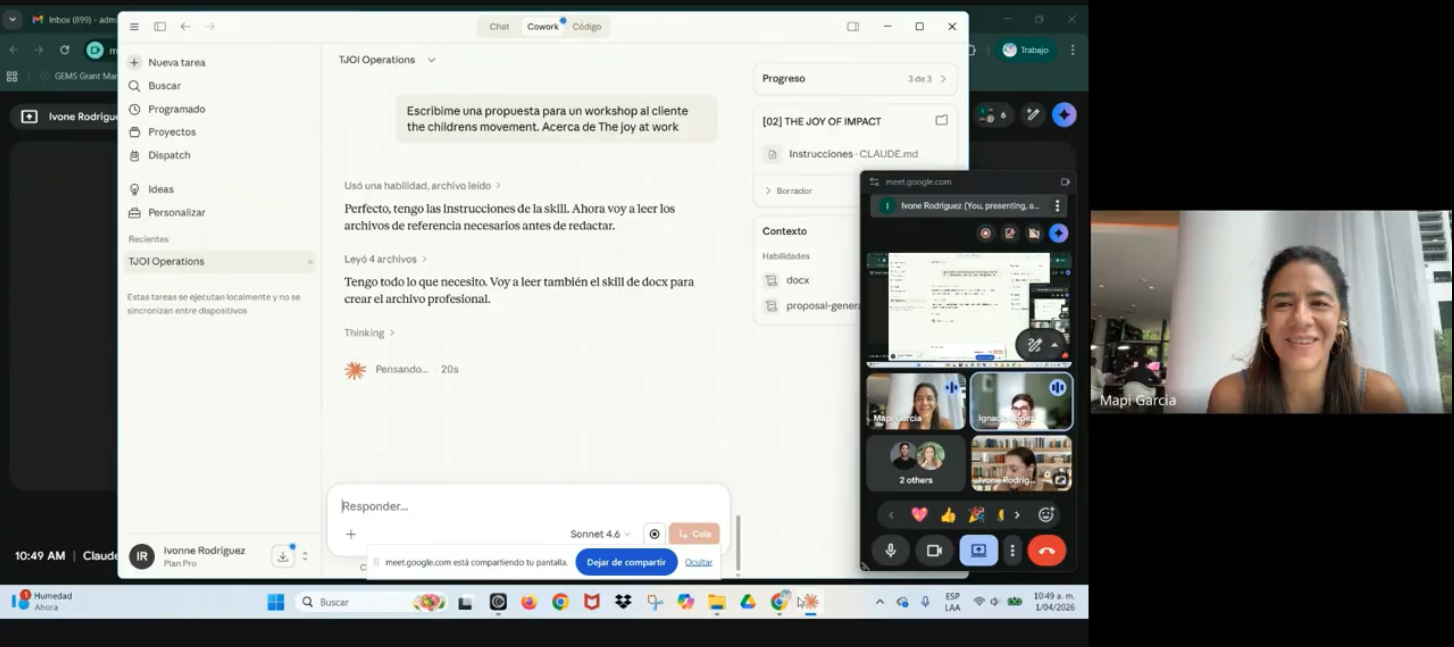
What your team will learn
Claude and Cowork Fundamentals
How Claude works. What Cowork mode (Claude's real-time desktop collaboration tool) is. How to set up your workspace: projects, memory, context files. This is the foundation. Your team stops treating AI like a search engine and starts treating it like a colleague that knows your business. Most teams are getting 20% of what Claude can do because nobody configured it properly.
Skills: Pre-Built and Custom
Skills are reusable instruction sets that teach Claude how to do your specific tasks. I pre-build them for your workflows: grant writing, spec sheets, meeting debriefs, proposal drafting, report generation. Then I teach your team to create their own. A skill for spec sheets means your designer clicks one button instead of explaining the format every time.
Shortcuts and Automation
Shortcuts are one-click commands for tasks you run daily. Automations are scheduled tasks that run without you: reports, file processing, recurring workflows. Your team learns to build both. The goal is zero repetitive prompting.
Staying Focused: How to Use AI Without Getting Sidetracked
AI tools can waste as much time as they save if your team doesn't know how to stay on track. This module covers how to scope a task before starting, how to avoid rabbit holes, how to evaluate AI output critically instead of accepting everything, and how to structure your AI workflow so it serves your priorities, not the other way around.
AI for Document Work
Finding, summarizing, and extracting information from contracts, reports, specs, and regulatory documents. A construction project manager shouldn't spend 60 minutes finding a certification status when AI returns it in 30 seconds.
AI for Reporting & Analysis
Turning scattered data into usable reports without manual compilation. Quarterly reports, project status updates, financial consolidation. The work that eats entire days.
AI for Client Communication
Drafting proposals, responding to inquiries, following up with leads. At speed, in your voice, without losing the personal touch. Your team learns to use Voice DNA and skills so every AI-drafted message sounds like your company, not like a chatbot.
AI Governance Basics
What's allowed, what's not, and how to build a policy before someone puts your client list into ChatGPT. Practical, not theoretical. Covers data classification, approved tools and workflows, audit trails, and a simple governance document your team signs off on.
Who this is for
- •Operations teams drowning in manual processes who need to see what AI can actually handle
- •Leadership teams who want everyone speaking the same language about AI before investing further
- •Companies that bought AI tools (Copilot, ChatGPT Enterprise, etc.) and adoption stalled at 15%
- •Field teams and non-technical staff who need hands-on practice, not a webinar
- •Companies without an AI policy who need governance basics before tools spread further
For solo business owners and small teams (1-4 people): The AI Ops Setup is the right entry point. Full Claude workspace configuration, custom skills for your workflows, shortcuts for daily tasks, and automation setup. Joy of Impact went from 6-8 hours per grant blueprint to 2-3 hours in the first month.
See how →Investment
| Format | Price | Duration | Best For |
|---|---|---|---|
| AI Ops Setup (Solo/Small Team) | Fixed-fee setup | 2-3 hrs + async | Solo consultants, small practices, 1-4 people |
| Department Workshop | Per department | 2 hours + pre-analysis | Teams of 3-10 within a company |
| Executive Briefing | Fixed-fee briefing | 2 hours | C-suite, leadership team |
| Enterprise Rollout (Multi-Dept) | Phased rollout | 2-4 weeks phased | Full company, multiple departments |
| Complimentary with Build | Included | Half-day | Every AI Foundation Build client |
On-site or virtual. In-person for South Florida (Brickell, Coral Gables, Doral) and Latin America. Virtual for everywhere else. Available in English and Spanish.
Florida companies: your training may be 75% reimbursed
Florida's Incumbent Worker Training (IWT) Grant reimburses 50-75% of training costs for companies training existing employees on new skills. AI workshops qualify. Companies with 50 or fewer employees get the highest tier: 75% reimbursement, up to $100,000 per fiscal year.
| Company Size | Reimbursement Rate |
|---|---|
| ≤ 50 employees | 75% |
| 51 to 200 employees | 50% |
What that means for you: A department workshop or enterprise rollout has 50-75% of its cost reimbursed. The grant is rolling. You apply, get approved, train, submit documentation, and receive reimbursement. No annual deadline. No lottery.
I handle the documentation your company needs for the IWT application, including curriculum outlines, learning objectives, and completion records.
All US companies: Section 127 educational assistance ($5,250/employee tax-free)
Under IRC Section 127, any US employer can provide up to $5,250 per employee per year in educational assistance, completely tax-free. The employee pays no income tax on it. The employer deducts it as a business expense. AI workshops qualify under the statute's broad definition: "any form of instruction or training that improves or develops the capabilities of an individual."
This benefit applies nationwide. No state restrictions. No industry restrictions. No company size restrictions. You need a written educational assistance plan on file (a simple one-page document), but the setup is straightforward.
Section 127 + IWT can stack. A Florida company with 50 or fewer employees can get 75% of the training cost reimbursed through IWT, and the remaining amount the company pays still qualifies as a deductible expense. The employees pay zero tax on the benefit either way.
Training has the best tax treatment of any AI investment
The R&D tax credit does not cover training. It explicitly excludes it from Qualified Research Expenses. But training has its own dedicated funding mechanisms. When combined, they can offset 75-100% of the cost for qualifying companies.
| Program | Benefit | Who Qualifies | Stacks? |
|---|---|---|---|
| Florida IWT Grant | 50-75% reimbursement | Florida companies, W-2 employees | Yes |
| Section 127 | $5,250/employee tax-free | Any US employer with a written plan | Yes |
| Employer deduction | Standard business expense deduction | Any US business | Yes |
A Florida company with 30 employees sending 10 people through a department workshop: 75% reimbursed through IWT, the remainder is a deductible business expense, and each employee's share is tax-free under Section 127. Effective out-of-pocket after tax benefit is a small fraction of the sticker price.
See how AI builds and retainers qualify for R&D credits →The train + retain path
A workshop gives your team the skills. But skills without infrastructure decay fast.
Most companies that start with training realize the next step is building the systems their team just learned about. The AI Foundation Build takes what the workshop surfaced (the workflows, the automations, the data problems) and turns it into production systems. Every build includes a complimentary half-day workshop to train the team on what was built.
For companies that already have infrastructure, the Fractional Head of AI retainer includes quarterly team training sessions as part of ongoing operations. New capabilities get deployed. Then the team gets trained on them. The system keeps evolving and the team keeps pace.
The path most clients follow: Diagnostic → Build → Retainer. Training is woven through every stage. For a live example, Joy of Impact completed their Claude workspace setup in a single session with custom skills deployed the same week.
Frequently Asked Questions
AI Ops Setup is for solo business owners or small teams of 1-4 people. It covers full workspace configuration, custom skills, shortcuts, automations, and follow-up support. A workshop is for department teams inside a company. It covers pre-analysis, hands-on training, and custom skills loaded into the team's tools. Setup goes deeper on one person. Workshops scale across departments.
Yes. This is designed for people who've never used Claude or AI before. Construction, legal, finance, operations. The non-technical people. We start with fundamentals, then move into the specific workflows your team actually does. You practice on your own files and data, live. You leave knowing how to use it the next morning.
Claude is the primary tool. We also cover Cowork mode (Claude's real-time collaboration tool), ChatGPT, Microsoft Copilot, Canva AI for visual content, and the automation platforms we configure for your specific workflows. The principles work across any AI tool. The difference is configuring them to your company's voice and business logic.
Yes, and the prep is what makes the workshop work. Participants complete a pre-flight checklist 48 hours before the session: install tools, sync folders, confirm access, run a test command. A one-hour pre-analysis call with the department lead lets me build custom skills before the session. Zero setup time during the workshop. Every minute is hands-on practice with real work, not troubleshooting installations.
Yes. Florida's Incumbent Worker Training Grant reimburses 50-75% of training costs for companies training existing employees. Companies with 50 or fewer employees get 75% reimbursement. I handle the documentation required for the IWT application. Nationwide, Section 127 allows $5,250 per employee per year in tax-free educational assistance, which training also qualifies for.
I've trained teams in nonprofits, construction, and fashion. All industries where technology is secondary to the core work. The format is hands-on, not lectures. Participants work on their actual workflows during the session. They leave with prompts and systems they use the next day. When the output saves 4 hours on their first grant proposal or project report, skepticism disappears.
Yes. Florida's Incumbent Worker Training (IWT) program reimburses 50-75% of training costs, up to $100K/year. Companies with 50 or fewer employees get the 75% rate. I qualify as an approved training provider.
Your team is already using AI. The question is whether they're using it well.
A half-day workshop gives your people Claude, Cowork, skills, shortcuts, and automations configured for their actual work. Not toy examples. They leave with a working system, not a slide deck. Book a call and I'll scope the right format for your team.